Network
Ports
Find open ports and filter over them
Windows prot forward port 8000
netsh interface portproxy add v4tov4 listenaddress=0.0.0.0 listenport=8000 connectaddress=<dis-ip-addr> connectport=8000
Restart net service to solve nekoray problem
NetStat
NETSTAT [-a] [-b] [-e] [-f] [-i] [-n] [-o] [-p proto] [-r] [-s] [-t] [-x] [-y] [interval]

  -a            Displays all connections and listening ports.
  -b            Displays the executable involved in creating each connection or
                listening port. In some cases, well-known executables host
                multiple independent components, and in these cases, the
                sequence of components involved in creating the connection
                or listening port is displayed. In this case, the executable
                name is in [] at the bottom, on top is the component it calls,
                and so forth until TCP/IP is reached. Note that this option
                can be time-consuming and will fail unless you have sufficient
                permissions.
  -e            Displays Ethernet statistics. This may be combined with the -s
                option.
  -f            Displays Fully Qualified Domain Names (FQDN) for foreign
                addresses.
  -i            Displays the time spent by a TCP connection in its current state.
  -n            Displays addresses and port numbers in numerical form.
  -o            Displays the owning process ID associated with each connection.
  -p proto      Shows connections for the protocol specified by proto; proto
                may be any of: TCP, UDP, TCPv6, or UDPv6.  If used with the -s
                option to display per-protocol statistics, proto may be any of:
                IP, IPv6, ICMP, ICMPv6, TCP, TCPv6, UDP, or UDPv6.
  -q            Displays all connections, listening ports, and bound
                nonlistening TCP ports. Bound non-listening ports may or may not
                be associated with an active connection.
  -r            Displays the routing table.
  -s            Displays per-protocol statistics.  By default, statistics are
                shown for IP, IPv6, ICMP, ICMPv6, TCP, TCPv6, UDP, and UDPv6;
                The -p option may be used to specify a subset of the default.
  -t            Displays the current connection offload state.
  -x            Displays NetworkDirect connections, listeners, and shared
                endpoints.
  -y            Displays the TCP connection template for all connections.
                Cannot be combined with the other options.
  interval      Redisplays selected statistics, pausing interval seconds
                between each display.  Press CTRL+C to stop redisplaying
                statistics.  If omitted, netstat will print the current
                configuration information once.
Watch open ports and find yours
Watch open ports with process number
L2
ARP
Clear all ARP cache
Clear an IP address
L3
Route
Show all routes
Add a new route
How to access the ZiTel onton
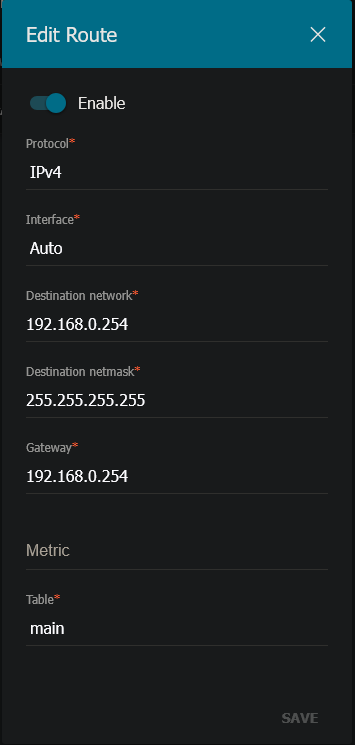
Note: I have also set another route on the access point
Anton access route