06. Install & Update Backup
Backup Candidates
- Resource Configuration
- ETCD Cluster
- Persist Volumes
- Velero is a Backup and migrate Kubernetes resources and persistent volumes
Installation, Configuration and Validation
Objectives
- Design a Kubernetes Cluster
- Choosing Kubernetes Infrastructure
- H.A. Kubernetes Cluster
- Deploy a Kubernetes Cluster
- Cluster E2E Test
Purpose use of Kubernetes Cluster
Education
- MiniKube
- Single-node cluster with Kubeadm/GCP/AWD
Development & Testing
- Multi-node cluster with a Single Master and Multiple Workers
- Setup using kubeadm tool or quick provision on GCP/AWS/AKS
Hosting Production Application
- Hight Available multi-node cluster with Multi Master Node
- Using kubeadm/KOps on-perm or GCP/AWS or other supported platform
- Considering for large cluster
- up to 5k nodes
- up to 150k PODs in the cluster
- up to 300k total containers
- up to 100 pods per node
Cloud or On-premise?
- Use Kubeadm/KOps/Kubespray for on-perm
- GKE for GCP
- EKS for AWS
- AKS for Azure
Workloads
- How many?
- What kind?
- Web
- AI
- Big Data Analytics
Application Resource Requirement
- CPU intensive
- Memory intensive
Storage
- High performance - SSD backed storage
- Multiple concurrent connections - Network-based storage
- Persist shared volumes - for shared access across shared PODs
Network Traffic
- Continuous Heavy
- Burst
Nodes
-
Virtual or physical machines
-
Master vs worker node
- Master nodes can host workloads (not recommended)
- Linux x86_64 architecture
Large Scale Master Nodes
- Is better to cluster ETCD on different machine
Choosing Kubernetes Infrastructure
Turnkey Solution
-
Openshift
-
Vagrant
Hosted Solution
- Manged by host
- K8S-as-a-Service
- GKE - Google kubernetes engine
- Amazon elastic container service for kubernetes (EKS)
- Microsoft Azure
Cluster High Availability
Tips
ControlePlane: Master Nodes
DataPlane: Worker Nodes
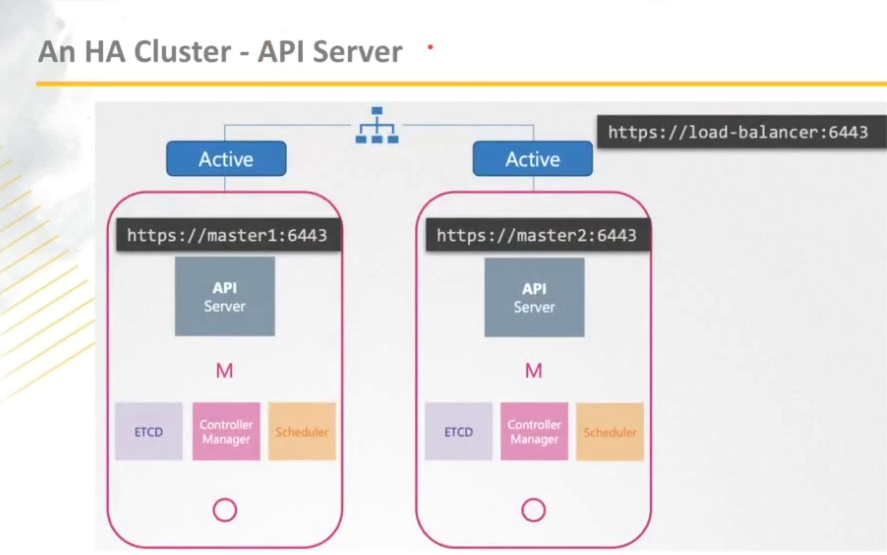
API Server
API-Server can cluster in Active Active mode via a loadbalancer (Nginx, Haproxy, ...)
Control Manager
Control-Manager must be cluster in Active Passive mode
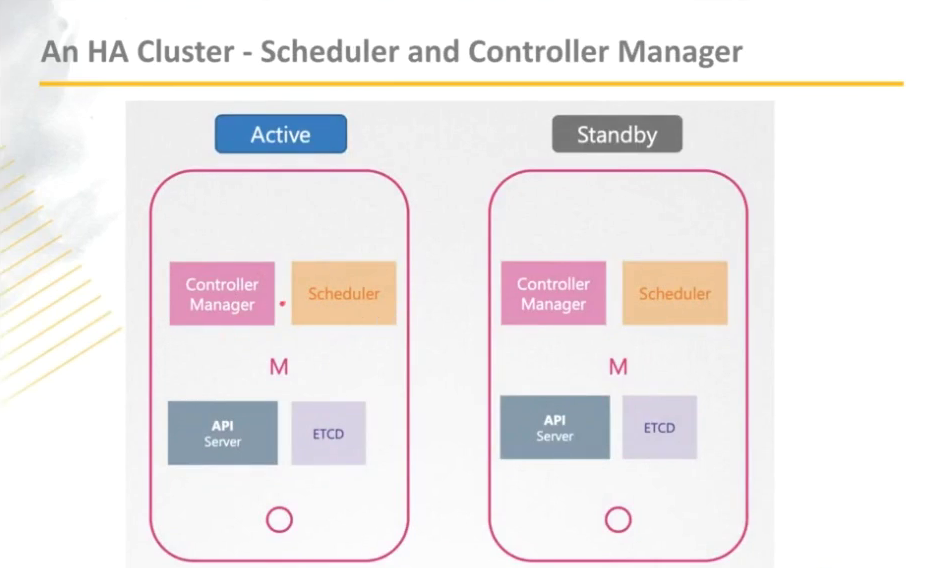
Scheduler
Scheduler must be cluster in Active Passive mode
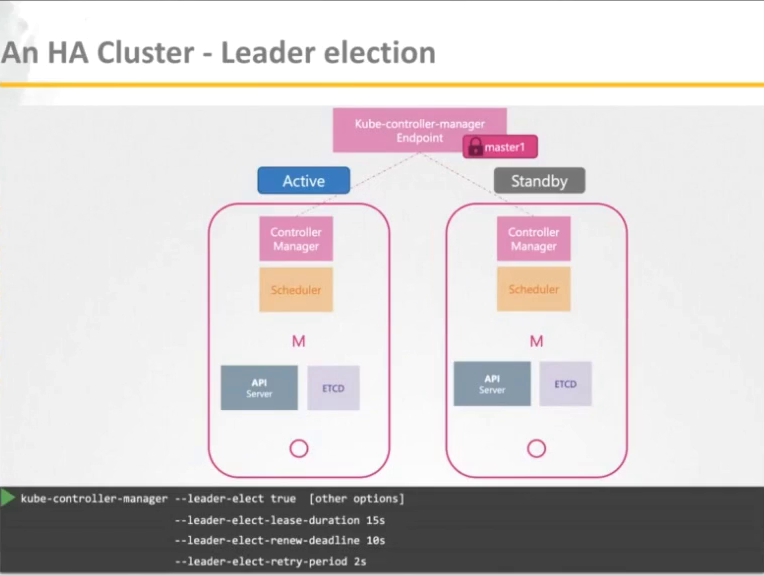
Leader Election
Leader election is a set of candidates for becoming leader is identified.
A simple view to get better understanding
ETC
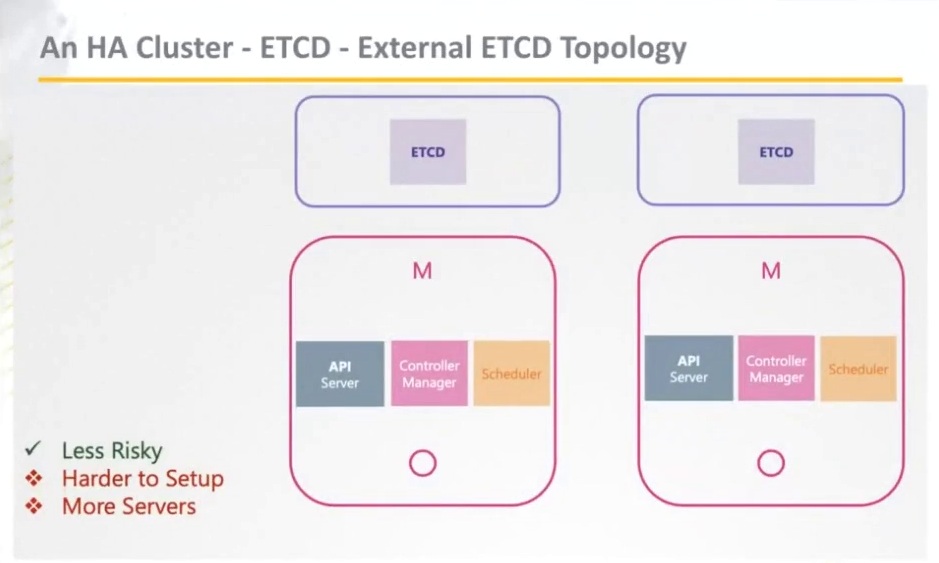
Options for Highly Available Topology
Stacked etcd topology
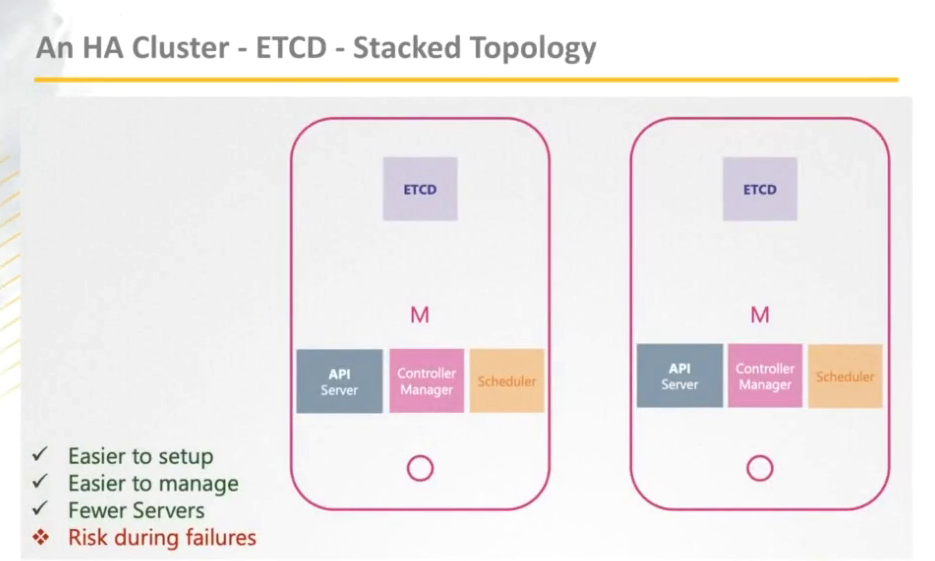
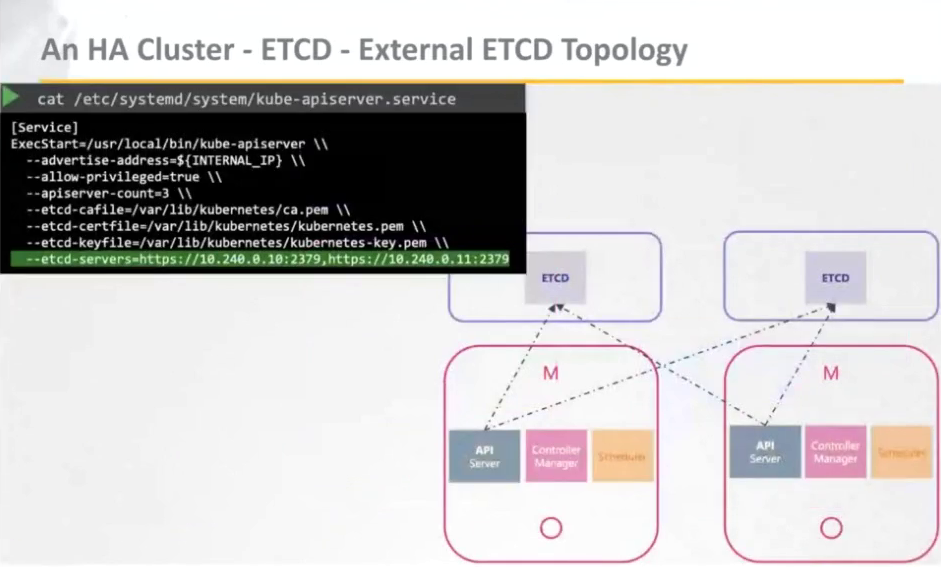
External etcd topology
API-Servers should recognize all ETCD external nodes
Number of ETCD Nodes
| Instances | Fault Tolerance | Usage |
|---|---|---|
| 1 | 0 | no |
| 2 | 0 | no |
| 3 | 1 | yes |
| 4 | 1 | no |
| 5 | 2 | yes |
| 6 | 2 | no |
| 7 | 3 | yes |
Deploy Kubernetes Cluster
Minimum 3 nodes to setup K8S cluster
Manually
Steps of Kubeadm
- Provision the VMs (master, worker)
- Select and install CRE (docker, crio, ...)
- Install kubeadm on all nodes
- Initialize the cluster (master node)
- Apply a CLI (calico, flannel, ...) on cluster
- Join worker nodes to the cluster
Automation
Developer Mode Provision
- vagrant
- Vagrantfile and Scripts to automate k8s setup using kubeadm
- kind
Cluster End2End Test (Validating)
- Full test has around 1K checks - take ages ~ 12h
- Conforming has around 160 checks - enough to be certified 1.5h
- Network should function for intra-pod communication
- Service should serve a basic endpoint from pods
- Service point latency should not very high
- DNS should provide DNS for services
- Secret should be consumable in multiple volume in a pod
- Secret should be consumable from pods in volume in mapping
- ConfigMap should be consumable from pods in volumes
Validate K8S Configuration with Sonobuoy
Commands
# get all resource configuration files from all namespaces
kubectl get --all-namespace -o yaml > all-deploy-services.yaml
Installation Tips
Join Nodes
Initialize master node to connect to cluster
kubeadm init \
--kubernetes-version $KUBERNETES_VERSION \
--apiserver-advertise-address $MASTERNODE_IP \
--pod-network-cidr 10.244.0.0/16
Join a Worker Node
On Master node
- Get cluster information to fetch
MASTER_IPandMASTER_PORT
- Get endpoints list
- Get
TOKENfrom the master
- Get the ca
HASHfrom the master
openssl x509 -in /etc/kubernetes/pki/ca.crt -pubkey -noout | openssl pkey -pubin -outform DER | openssl dgst -sha256 | cut -d' ' -f2
# or
openssl x509 -pubkey -in /etc/kubernetes/pki/ca.crt | openssl rsa -pubin -outform der 2>/dev/null | openssl dgst -sha256 -hex | sed 's/^.* //'
On Worker node
- Join a worker to master
Upgrade K8S Cluster
# upgrade cluster via kubeadm and "-1/+1" strategy

# Master nodes
kubeadm upgrade plan
sudo apt install kubeadm=vM.m.p # example v1.29.3
kubeadm upgrade apply vM.m.p
sudo apt install kubectl=vM.m.p # as same as kubeadm version
sudo systemctl restart kubelet
kubectl get nodes

# Worker nodes

## execute it from master node
kubectl get nodes
kubectl drain worker-node-01 --ignore-daemonsets

## execute it from worker-node-01
sudo apt install kubeadm=vM.m.p # as same as kubeadm version
sudo apt install kubelet=vM.m.p # as same as kubeadm version
kubeadm upgrade node
sudo systemctl restart kubelet
kubectl uncordon worker-node-01
kubectl get nodes
# do it the same for other nodes

# unhold packages if you would have done before
Backup etcd
# via 'etcdctl'

## take the snapshot
sudo ectdctl snapshot save <snapshot_name.db> --cert="" --cacert="" --key=""

## show the taken snapshot
sudo ectdctl snapshot status --write-out=table <snapshot_name.db> --cert="" --cacert="" --key=""

# Restore backup

## 1st: remove API-Server
mv /path/to/k8s/config/kube-apiserver.yaml  kube-apiserver.yaml.main

## 2nd: restore a specific snapshot file
sudo ectdctl snapshot restore --date-directory <..> --initial-cluster <..> --initial-advertise-peer-urls <..> --name=<..>

## 3th: set new ectd data-directory path
sudo vim /path/to/ectd/config.yaml
change volumes -> hostPath -> path

## 4th: restore API-Server
mv /path/to/k8s/config/kube-apiserver.yaml.main  kube-apiserver.yaml