Kubernetes Commands
Kubernetes commands and cheatsheet
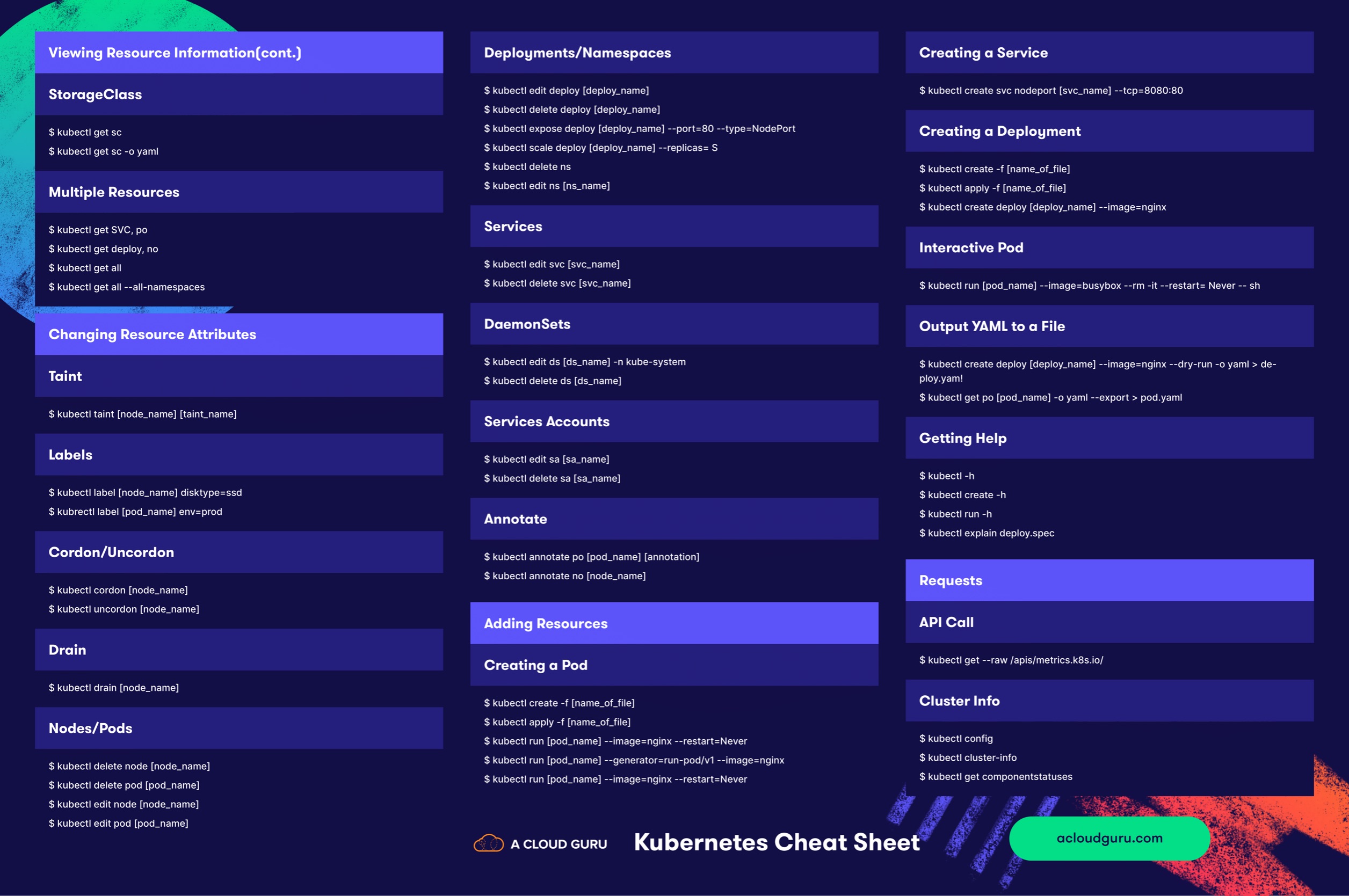
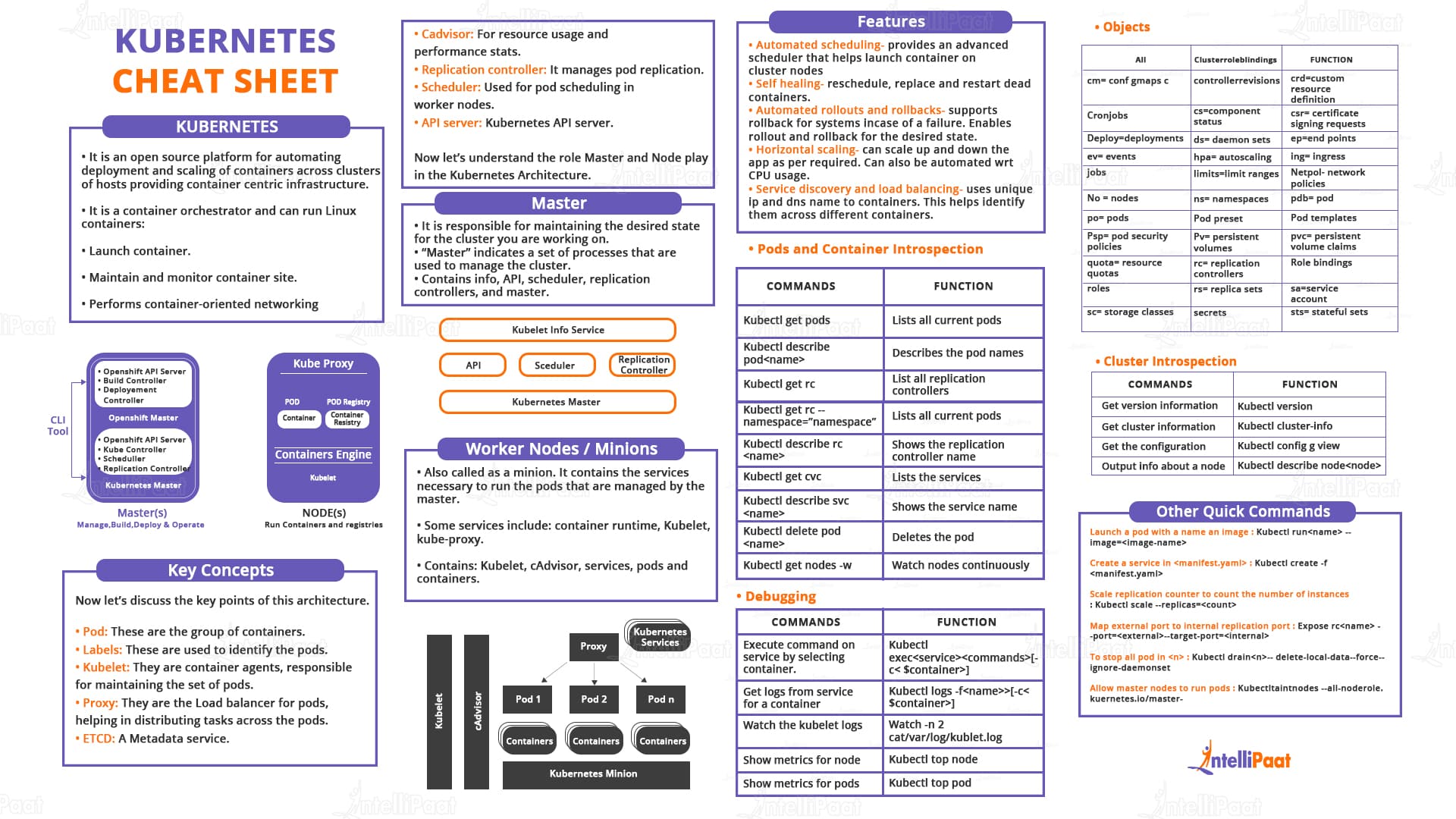
Kubectl
Installation
'x86/64' architecture
curl -LO "https://dl.k8s.io/release/$(curl -L -s https://dl.k8s.io/release/stable.txt)/bin/linux/amd64/kubectl"
Version and Info
Top
Check metric server exists
If returned any values means 'metric server' is active and the other not.
Nodes
Get All Nodes
Describe Nodes
Set label for a node
kubectl label node <node-name> kubernetes.io/role=node
kubectl label node <node-name> label_key=label_value
kubectl label node <node-name> label_key- # remove added label from node"
Taint
add/del taint
kubectl taint node <node-name> taint_label_key=taint_label_value:TaintEffect # add taint label to node"
kubectl taint node <node-name> taint_label_key- # remove added taint label to node"
TaintEffect: [NoSchedule, PreferNoSchedule or NoExecute]
get node taint
Pods
kubectl -n kube-system get pods -o wide
kubectl -n kube-system describe pods <podname>
kubectl delete <pod_name>
kubectl get pods --show-labels
kubectl get pods -o yaml > pods.yaml
kubectl describe pod
kubectl explain pod
kubectl explain pod.spec
kubectl explain pod.spec.ports
kubectl explain pod.spec.containers.ports
kubectl explain pod.spec.affinity
kubectl exec -it <pod-name> bash # get an interactive shell from a running pod
kubectl exec -it <pod-name> -- bash
kubectl get pods --selector key=value
Resource Modification
kubectl create -f <pod_file_name.yml>
kubectl replace -f <pod_file_name.yml>
kubectl get rs -o wide
kubectl apply -f <file-name.yml>
kubectl delete -f <manifest-filename.yml>
Explain
kubectl explain <config-kind>
kubectl explain resourcequota
kubectl explain resourcequota.spec
kubectl explain resourcequota.spec.hard
Update a resource
Namespace
kubectl get namespace
kubectl get ns
kubectl create namespace <ns-name>
kubectl get -n <ns-name> pods
kubectl describe <ns-name>
kubectl -n <ns-name> events
kubectl get pods --all-namespaces
kubectl config view --minify --output 'jsonpath={..namespace}' # get current ns
ConfigMap
# imperative method
# from cli
kubectl create configmap <config-name> --from-literal=<key=value>
# from file
kubectl create configmap <config-name> --from-file=<path-to-file>
# declarative method
kubectl create/apply -f <configmapfile.yml>
# describe
kubectl describe cm <configmapfile.yml>
kubectl describe cm <configmapfile.yml> --output yaml
Secret
# imperative method
# from cli
kubectl create secret <config-name> --from-literal=<key=value>
# from file
kubectl create secret <config-name> --from-=<path-to-file>
# declarative method
kubectl create/apply -f <secret-configmapfile.yml>
# describe
kubectl describe secret <configmapfile.yml>
kubectl describe secret <configmapfile.yml> --output yaml
Drain/Cordon/Uncordon
kubectl drain <node-name>; drain execute cordon command
kubectl cordon <node-name> ;set unscheduled label to node
kubectl uncordon <node-name> ;Remove unscheduled label from node
Application Lifecycle Commands
kubectl create -f <deployment-filename.yml>
kubectl replace -f <deployment-filename.yml>
kubectl apply -f <deployment-filename.yml> # both create & replace
kubectl get <deployment-name>
kubectl set image <deployment-name> <image=imagename:imagetag>
Rollout
kubectl rollout status <deployments/deployment-name>
kubectl rollout history <deployments/deployment-name>
kubectl rollout undo <deployments/deployment-name> # go to pervious version
kubectl rollout undo <deployments/deployment-name> --to-revision <rv-no> # go to pervious version
watch -d kubectl get replicasets
watch and debug command
kubectl describe <resource-type> <resource-name>
kubectl logs -f <resource-name>
kubectl events --for <resource-type>/<resource-name> --watch
kubectl events --types=Warning,Normal
Kubernetes Dashboard
Create serviceaccount first
Bind SA to Cluster via clusterrolebinding
kubectl create clusterrolebinding dashboard-admin \
  --clusterrole=cluster-admin \
  --serviceaccount=kube-system:dashboard-admin
Get the admin token and paste it to your dashboard page