Configuration
Terminology
The two main configuration terms Context & Directive
Watch these steps
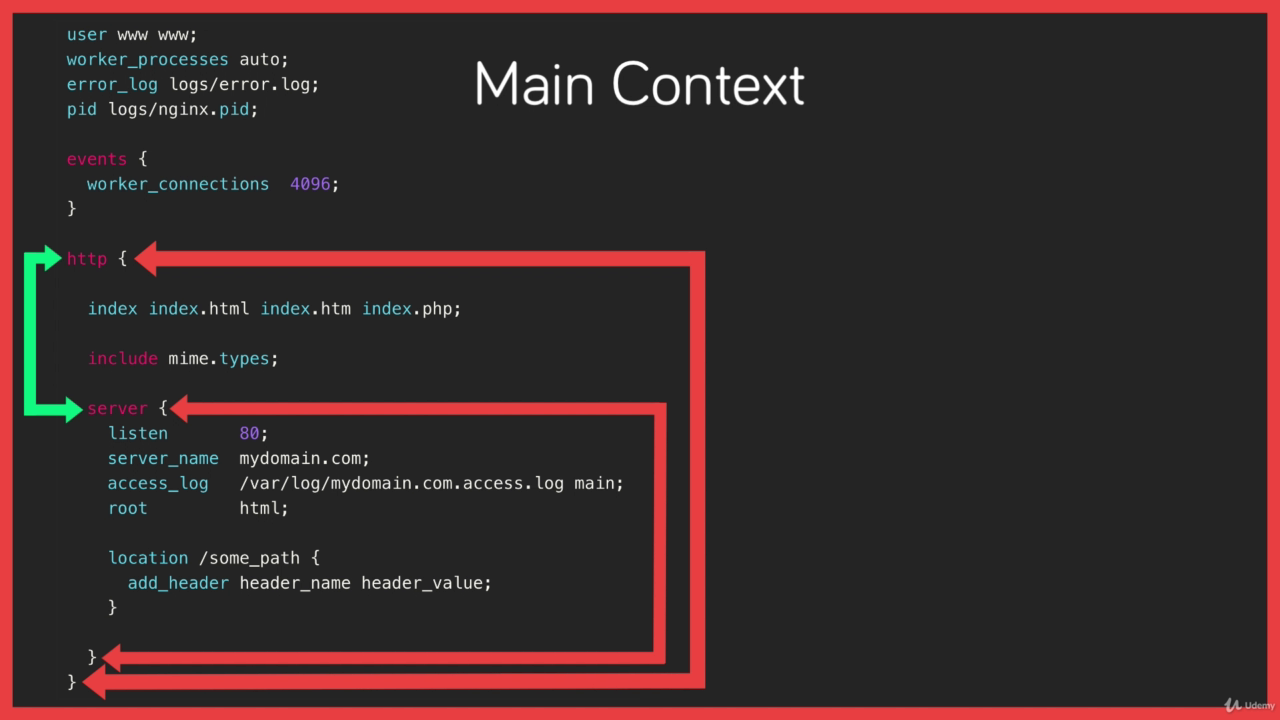
Context
- Context is a section with the configuration where directive can be set for that given context.
- Contexts are also nested and inherit from their parents
Example
- In the below picture we have hierarchical context
http,server,locationand a single contextevents
Directive
- A specific configuration option that gets set in the configuration files and consist of a key and value
Example
- server_name
mydomain.com
VirtualHost
Sample Virtualhost configuration
events {

}

http {

    include mime.types;

    server {
        listen 80;
        server_name 127.0.0.1;
        root /tmp/nginx/site/demo;
    }
    server {
        listen 8081;
        server_name localhost;
        root /home/mehrdad/sb/mehrdad-drpc.github.io-master;
    }
}
Note: mime.type is a file what include all html type to apply nginx
Location Context
According to the priority
- Exact match
- Preferential prefix match
- REGEX match
- Prefix match
http {

 include mime.types;

    server {
        listen 80;
        server_name 127.0.0.1;
        root /tmp/nginx/site/demo;

    # 1
    # Exact match
    location = /exact {
     return 200 "Hello Nginx from EXACT match - exact";
    }

    # 2
    # Preferential prefix match
    # Note: Preferential is more importer than REGEX
    location ^~ /Mehrdad0 {
        return 200 "Hello Nginx from Preferential prefix match - Preferential";
    }

    # 3
    # REGEX match - case sensetive
    location ~ /regex[0-9] {
        return 200 "Hello Nginx from sensetive REGEX match - regex";
    }

    # 3
    # REGEX match - case insensetive
    # Note: the regular expression is more importer that prefix
    location ~* /mehrdad[0-9] {
        return 200 "Hello Nginx from insensetive REGEX match - regex";
    }

    # 4
    # Prefix match
    location /greet {
        return 200 "Hello Nginx from GREET match - prefix";
    }

    # # p refix match
    # location /Mehrdad0 {
    #   return 200 "Hello Nginx from prefix test match - prefix";
    # }

    }
}
Variables
Nginx URI Schema Variables

http {

    include mime.types;

    server {
        listen 80;
        server_name 127.0.0.1;
        root /tmp/nginx/site/demo;

    # if ( $arg_apikey != 1234) {
    #   return 401 "Incorrect API Key";
    # }

    # Variables can be set 'string', 'integers' and 'boolean'
    set $weekend 'No';

    # check the variable with regular expression
    if ( $date_local ~ 'Saturday|Sunday') {
        set $weekend 'Yes';
    }

    location /is_weekend {
        return 200 "Today is $date_local and weekend is $weekend" ;
    }

    location /inspect {
        return 200 "$host\n$uri\n$args";
    }

    # print the value of query parameter
    location /args {
        return 200 "The query value is: $arg_name";
    }

    }
}
Rewrites & Redirects
- rewrite pattern URI
- return status URI
http {

    include mime.types;

    server {
        listen 80;
        server_name 127.0.0.1;
        root /tmp/nginx/site/demo;

        rewrite ^/user/(\w+) /greet/$1;

        location /greet {
            return 200 "Hello User";
        }

        location = /greet/mehrdad {
            return 200 "Hello Mehrdad";
        }
    }
}
Try-Files & NameLocation
http {

    include mime.types;

    server {
        listen 80;
        server_name 127.0.0.1;
        root /tmp/nginx/site/demo;

        # only the very last argument causes a rewrite
        # @ 'Name Location' assigns a name to a location context
        try_files $uri /x.png @greet /friendly_404;

        location /greet {
            return 200 "Hello User";
        }

        location /friendly_404 {
            return 404 "Sorry, The page could not be found.";
        }
    }
}
Note: @greet is a named location that assigns greet name to greet location
Logging
Error Log
As the name suggests for anything that failed or didn't happen as expected.
Access Log
Log all request to the server
Both of logs are located in /var/log/nginx
Custom Log File
We can also create custom log files or disable logging all together
- access_log
- error_log
Access Log format
- Syntax: access_log path
[format [buffer=size] [gzip[=level]] [flush=time] [if=condition]];access_log off; - Default: access_log logs/access.log combined;
- Context: http, server, location, if in location, limit_except
Error Log format
- Syntax: error_log file [level];
- Default: error_log logs/error.log error;
- Context: main, http, server, location,mail, stream, if in location, limit_except
Example
http {

    include mime.types;

    server {
        listen 80;
        server_name 127.0.0.1;
        root /tmp/nginx/site/demo;

        location /secure {
            # access_log /var/log/nginx/secure.access.log;
            access_log off;
            return 200 "Welcome to secure area.";
        }
    }
}
Inheritance & Directive Types
Directive Types
- Standard Directive
- Array Directive
- Action Directive
events {}

######################
# (1) Array Directive
######################
# Can be specified multiple times without overriding a previous setting
# Gets inherited by all child contexts
# Child context can override inheritance by re-declaring directive
access_log /var/log/nginx/access.log;
access_log /var/log/nginx/custom.log.gz custom_format;

http {

  # Include statement - non directive
  include mime.types;

  server {
    listen 80;
    server_name site1.com;

    # Inherits access_log from parent context (1)
  }

  server {
    listen 80;
    server_name site2.com;

    #########################
    # (2) Standard Directive
    #########################
    # Can only be declared once. A second declaration overrides the first
    # Gets inherited by all child contexts
    # Child context can override inheritance by re-declaring directive
    root /sites/site2;

    # Completely overrides inheritance from (1)
    access_log off;

    location /images {

      # Uses root directive inherited from (2)
      try_files $uri /stock.png;
    }

    location /secret {
      #######################
      # (3) Action Directive
      #######################
      # Invokes an action such as a rewrite or redirect
      # Inheritance does not apply as the request is either stopped (redirect/response) or re-evaluated (rewrite)
      return 403 "You do not have permission to view this.";
    }
  }
}
Worker Process
Worker
- worker_process: the number of nginx worker
- worker_connection: the number of each worker can handle
- worker_process * worker_connection = max connection
worker_processes 1024;

# override nginx process id
pid /var/run/new_nginx.pid;

events {
    worker_connections 1024;
}

http {

    include mime.types;

    server {
        listen 80;
        server_name 127.0.0.1;
        root /tmp/nginx/site/demo;
    }
}
Buffer & Timeouts
user www-data;

worker_processes auto;

events {
  worker_connections 1024;
}

http {

  include mime.types;

  # Buffer size for POST submissions
  client_body_buffer_size 10K;
  client_max_body_size 8m;

  # Buffer size for Headers
  client_header_buffer_size 1k;

  # Max time to receive client headers/body
  client_body_timeout 12;
  client_header_timeout 12;

  # Max time to keep a connection open for
  keepalive_timeout 15;

  # Max time for the client accept/receive a response
  send_timeout 10;

  # Skip buffering for static files
  sendfile on;

  # Optimise sendfile packets
  tcp_nopush on;

  server {

    listen 80;
    server_name 167.99.93.26;

    root /sites/demo;

    index index.php index.html;

    location / {
      try_files $uri $uri/ =404;
    }

    location ~\.php$ {
      # Pass php requests to the php-fpm service (fastcgi)
      include fastcgi.conf;
      fastcgi_pass unix:/run/php/php7.1-fpm.sock;
    }

  }
}
Dynamic Module
Add image filtering module
Example Configuration
worker_processes auto;

load_module modules/ngx_http_image_filter_module.so;

events {
  worker_connections 1024;
}

http {

  include mime.types;

  # Buffer size for POST submissions
  client_body_buffer_size 10K;
  client_max_body_size 8m;

  # Buffer size for Headers
  client_header_buffer_size 1k;

  # Max time to receive client headers/body
  client_body_timeout 12;
  client_header_timeout 12;

  # Max time to keep a connection open for
  keepalive_timeout 15;

  # Max time for the client accept/receive a response
  send_timeout 10;

  # Skip buffering for static files
  sendfile on;

  # Optimise sendfile packets
  tcp_nopush on;

  server {

    listen 80;
    server_name 167.99.93.26;

    root /sites/demo;

    location = /thumb.png {
      image_filter rotate 180;
    }

  }
}