Nginx Security Section
SSL, TLS
Redirect http traffic to https and active TLS instead of SSL
worker_processes auto;

events {
  worker_connections 1024;
}

http {

  include mime.types;

  # Redirect all HTTP traffic to HTTPS
  server {
    listen 80;
    server_name 127.0.0.1;
    return 301 https://$host$request_uri;
  }

  server {

    listen 443 ssl http2;
    server_name 127.0.0.1;

    root /sites/demo;

    index index.html;

    ssl_certificate /etc/nginx/ssl/self.crt;
    ssl_certificate_key /etc/nginx/ssl/self.key;

    # Disable SSL
    ssl_protocols TLSv1 TLSv1.1 TLSv1.2;

    # Optimize cipher suits
    ssl_prefer_server_ciphers on;
    ssl_ciphers ECDH+AESGCM:ECDH+AES256:ECDH+AES128:DH+3DES:!ADH:!AECDH:!MD5;

    # Enable DH Params
    ssl_dhparam /etc/nginx/ssl/dhparam.pem;

    # Enable HSTS
    add_header Strict-Transport-Security "max-age=31536000" always;

    # SSL sessions
    ssl_session_cache shared:SSL:40m;
    ssl_session_timeout 4h;
    ssl_session_tickets on;

    location / {
      try_files $uri $uri/ =404;
    }

  }
}
Generate dhparam pem file
Redirect non-HTTPS traffic to HTTPS
Redirect non-http to https
Production Security Check-list
security checklist
- close all incoming ports
- close all accessibility
- change SSH port
- close root login
Rate Limiting
common reasons to set rate limiting for nginx
- Security: Brute Force Production
- Reliability: Prevent Traffic Spikes
- Shaping: Service Priority
worker_processes auto;

events {
  worker_connections 1024;
}

http {

  include mime.types;

  # Define limit zone
  # we can use $server_nam, $binary_remote_addr
  limit_req_zone $request_uri zone=MYZONE:10m rate=1r/s;

  # rate limit according to REQUEST_URI
  # MYZONE:10m means 10 mg size of MYZONE in memory
  # rate=1r/s means one request per second like 60r/m
  server {
    server_name 127.0.0.1;
    root /sites/demo;
    index index.html;

    location / {
      limit_req zone=MYZONE burst=5 nodelay;
      try_files $uri $uri/ =404;
    }
  }
}
Tips: first define a zone with after that use this zone with own parameters to location context
Note: 1r/s + 5 bust 6 connections
Basic Auth
At the first we need to apache2-utils on debian base linux and httpd-utils on redhat base linux
after that run the htpasswd command
worker_processes auto;

events {
  worker_connections 1024;
}

http {

  include mime.types;

   server {

    listen 443 ssl http2;
    server_name 127.0.0.1;

    root /home/mehrdad/sb/lab/demo;

    location  / {
      auth_basic "secure area";
      auth_basic_user_file /etc/nginx/.htpasswd;
    }
  }
}
Nginx Hardening
worker_processes auto;

events {
  worker_connections 1024;
}

http {

  include mime.types;
  server_tokens off;

    server {

        server_name 167.99.93.26;
        root /sites/demo;
        index index.html;

        add_header X-Frame-Options "SAMEORIGIN";
        add_header X-XSS-Protection "1; mode=block";

        location / {
            try_files $uri $uri/ =404;
        }
    }
}
Note: add some parameters like --without-http_auto_index_module in build step.
Let's Encrypt - SSL Certifications
useful link
httP {

    server {

        listen 443 ssl;
        server_name yourdomian.com

        location / {
            return 200 "Hello from Nginx";
        }

        # manage by certbot
        ssl_certificate  /etc/letsencrypt/live/fullchain.pem
        ssl_certificate_key  /etc/letsencrypt/live/private.pem
        include  /etc/letsencrypt/options-ssl-nginx.conf
        ssl_dhparam  /etc/letsencrypt/.../ssl-dhparams.pem
    }
}
Hardening CheatSheet
- Core configuration: server, location, and upstream blocks
- Load balancing: round-robin, least_conn, and IP hash strategies
- Caching and compression: proxy_cache and gzip
- SSL/TLS: enabling HTTPS and managing certificates
- Logging and monitoring: access_log and stub_status
Hardening CheatSeet
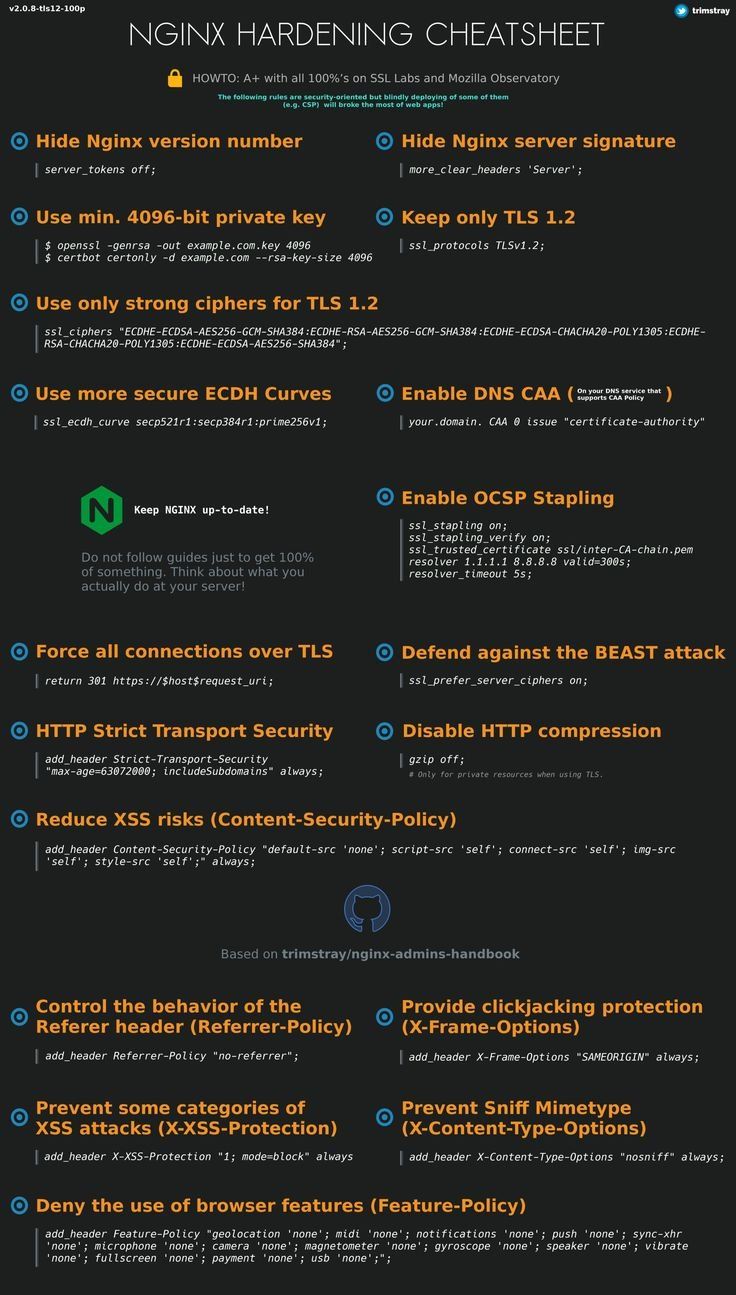
Hardening CheatSeet